Constraints are used to specify rules for data in a table.
If there is a data behavior that violates the constraint, the behavior will be terminated by the constraint.
Constraints can be specified when creating a table (via CREATE TABLE statement), or after the table is created (via ALTER TABLE statement).
Constraints ensure the accuracy and reliability of data in the database.
Constraints can be column-level or table-level. Column-level constraints apply only to columns, table-level constraints apply to the entire table.
Constraints are also very useful for capturing exceptional values and content that application code didn't consider but needs to be captured before the INSERT statement.
To illustrate the main constraint types, consider an example database schema shown in the following figure, where you are creating a room reservation system containing a user table, a room table, and a reservation table referencing users and rooms, along with a start and end time.
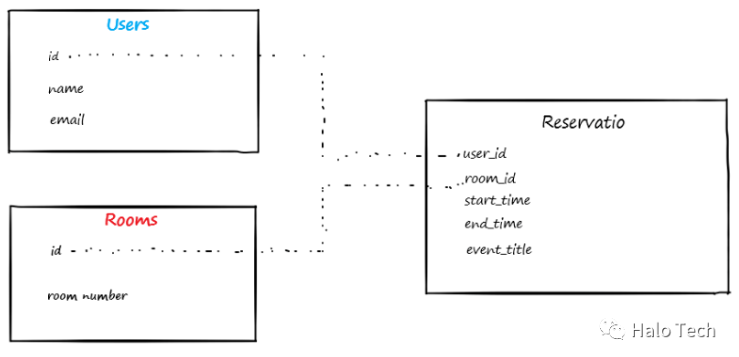
Set up the first two tables for users and rooms without any restrictions:
CREATE TABLE users (
        id serial PRIMARY KEY,
        name text,
        email text
    );
CREATE TABLE rooms (
        id serial PRIMARY KEY,
        roomnumber text
    );
Primary Key Constraint: PRIMARY KEY
A primary key is the unique identifier for a row of data, requiring non-null and unique values. A table can have only one primary key.
-- 1. Add constraint
-- 1.1 Add primary key constraint when creating table
As in the creation of Users and Rooms tables above
-- 1.2 Add primary key constraint after table creation
ALTER TABLE table_name ADD PRIMARY KEY(column_name);-- 2. Drop constraint
ALTER TABLE table_name DROP PRIMARY KEY;Foreign Key Constraint: FOREIGN KEY
Add a third table referencing these primary keys, using a foreign key constraint.
CREATE TABLE reservations (
        user_id int references users(id),
        room_id int references rooms(id),
        start_time timestamp,
        end_time timestamp,
        event_title text
     );
You can bind the reservations table to other data tables, ensuring they are tied together with the primary keys.
You can also create foreign key constraints on existing tables using ALTER TABLE:
ALTER TABLE public.reservations
       ADD CONSTRAINT reservations_user_id_fkey FOREIGN KEY (user_id) REFERENCES public.users(id);
ALTER TABLE public.reservations
       ADD CONSTRAINT reservations_room_id_fkey FOREIGN KEY (room_id) REFERENCES public.rooms(id);
A foreign key constraint is named, for example, reservations_user_id_fkey. If you don't provide a name, one is automatically generated.
Cascading and Foreign Keys
When using foreign key constraints, you should pay attention to cascading updates and deletes.
Foreign keys can define the impact on data when changes are made to the linked table. These are modifiers of the foreign key constraint: ON DELETE and ON UPDATE. Cascading deletes are especially important if you need to delete user data due to GDPR or other privacy requirements.
For example, suppose in this schema, you want to delete users after a certain time and also want to delete the reservation history. Adding this constraint will delete rows in the reservations table when a user row is deleted.
ALTER TABLE public.reservations
      ADD CONSTRAINT reservations_user_id_fkey FOREIGN KEY (user_id) REFERENCES public.users(id) ON DELETE CASCADE;
If you do not provide ON DELETE CASCADE, the database will prevent deleting records from the users table unless all reservation records for that user are deleted first.
Note: The cascade statement must be added when adding the foreign key constraint. It cannot be added later via ALTER TABLE.
Unique Constraint: UNIQUE
A unique constraint requires that data in a column or row is unique. This is especially useful when creating usernames, unique identities, or any primary key.
For example, we want to set a unique constraint on room numbers so you don't accidentally get duplicate room numbers:
ALTER TABLE ONLY public.rooms
    ADD CONSTRAINT room_number_unique UNIQUE (roomnumber);
Name a unique key constraint, e.g., room_number_unique. If you don't provide a name, one is automatically generated.
Not-Null Constraint: NOT NULL
When examining this data schema, you need to identify places where null data is not allowed. Adding a not-null constraint is a good way to ensure that incomplete data rows are not added.
An example here is ensuring you have a room number for a reservation.
ALTER TABLE public.reservations ALTER COLUMN room_id SET NOT NULL;Another is ensuring all reservations have start and end times:
ALTER TABLE public.reservations ALTER COLUMN start_time SET NOT NULL;
ALTER TABLE public.reservations ALTER COLUMN end_time SET NOT NULL;
If you query the list of constraints, not-null constraints are not named and do not appear in the pg_constraints system table.
Check Constraint: CHECK
By having the database check something before insertion, check constraints are a good way to add some simple logic to data. Check constraints apply to single rows in a table.
For example, in this schema, we need to add some logic for reservation times. Start time should be less than end time. Start time should be greater than 8 AM and less than 5 PM. And the interval between start time and end time should be greater than 30 minutes.
Check constraint syntax:
start_time less than end_time
ALTER TABLE public.reservations
      ADD CONSTRAINT start_before_end check (start_time < end_time );
Start time must be greater than 8 AM, end time must be less than 5 PM.
ALTER TABLE public.reservations
      ADD CONSTRAINT daytime_check check (start_time::time >= '08:00:00' AND end_time::time <= '17:00:00');
The interval between start time and end time is greater than 30 minutes.
ALTER TABLE public.reservations
       ADD CONSTRAINT interval_check check (end_time - start_time >= interval '30 minutes');
Finding Constraints in the Database
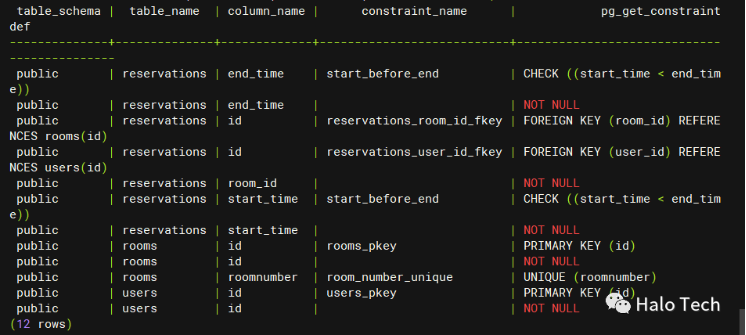
If you need to see what constraints you already have, the following query will display all types of constraints that have been created so far:
SELECT * FROM (
    SELECT
            c.connamespace::regnamespace::text as table_schema,
            c.conrelid::regclass::text as table_name,
            con.column_name,
            c.conname as constraint_name,
            pg_get_constraintdef(c.oid)
    FROM
            pg_constraint c
    JOIN
            pg_namespace ON pg_namespace.oid = c.connamespace
      JOIN
            pg_class ON c.conrelid = pg_class.oid
    LEFT JOIN
        information_schema.constraint_column_usage con ON
          c.conname = con.constraint_name AND
        pg_namespace.nspname = con.constraint_schema
    UNION ALL
    SELECT
        table_schema, table_name, column_name, NULL, 'NOT NULL'
    FROM information_schema.columns
    WHERE
            is_nullable = 'NO'
        ) all_constraints
WHERE
    table_schema NOT IN ('pg_catalog', 'information_schema')
    ORDER BY table_schema, table_name, column_name, constraint_name ;