HWR can help us identify most resource-consuming activities in the Halo database and can generate analysis reports similar to Oracle AWR.
HWR extension is based on the standard statistical views of Halo. It generates snapshots at specified times and provides HTML format to interpret the statistics between snapshots. Suppose the database performance dropped a few hours ago, regular sampling snapshots can help find the most resource-consuming activities within the past time period. We can generate a report between two snapshots to view the database load profile and thus locate the time window when the performance problem occurred.
HWR is written in pure PL/pgSQL and does not require any external libraries or software, only the Halo database running in Oracle compatibility mode. Call the take_sample() function to obtain a snapshot sample. It is recommended to use cron to schedule this task regularly.
Each time a sample is taken, pg_stat_statements_reset() is called to avoid losing SQL statement statistics due to reaching pg_stat_statements.max.
1. Prerequisites
Set parameters in postgresql.conf file:
database_compat_mode = 'oracle'
track_activities = on
track_counts = on
track_io_timing = on
track_wal_io_timing = on  # Since Halo 14
track_functions = all
pg_stat_statements.max = 1000
pg_stat_statements.track = 'top'
And create Oracle extension in the database:
psql
# CREATE EXTENSION aux_oracle CASCADE;
2. Installation of HWR
Step 1: Create extension
psql
# CREATE SCHEMA hwr;
# CREATE EXTENSION hwr SCHEMA hwr CASCADE;
# \dx
All HWR objects will be created under the hwr schema.
Configure in postgresql.conf:
shared_preload_libraries = 'pg_stat_statements' # (change requires restart)Step 2: Prepare script hwr_take_sample.sh
Operate as halo user:
cd $HALO_HOME/admin/hwr
cp hwr_take_sample.sh.sample hwr_take_sample.sh
Modify environment variables such as HALO_HOME, PGHOST in hwr_take_sample.sh (configure according to actual path), for example:
export HALO_HOME=/u01/app/halo/product/dbms/14
export LD_LIBRARY_PATH=$HALO_HOME/lib
export PATH=$HALO_HOME/bin:$PATH
export PGHOST=/var/run/halo
psql -c 'SELECT hwr.take_sample()'
Authorize the script:
chmod 750 hwr_take_sample.shStep 3: Enable crontab for user halo
If not enabled, execute as root user:
echo halo >> /etc/cron.allowStep 4: Add hwr_take_sample.sh to crontab
# Edit crontab
crontab -e

# View crontab
crontab -l
For example, execute once every hour:
0 * * * * /u01/app/halo/product/dbms/14/admin/hwr/hwr_take_sample.sh > /u01/app/halo/product/dbms/14/admin/hwr/hwr_take_sample.sh.log 2>&1The collection frequency can be adjusted according to needs.
3. How to Use HWR
Set extension parameters
Define the following HWR parameters in postgresql.conf (default values):
# Number of Top N objects displayed in each table of the report (affects sample size)
hwr.topn = 20

# Sample retention days, overdue samples are automatically cleaned up during the next take_sample()
hwr.max_sample_age = 7

# Whether to record detailed sampling time consumption
hwr.track_sample_timings = off

# Maximum length of query text in the report (does not affect collection, only truncates display)
hwr.max_query_length = 20000
Samples (Snapshots)
Each sample contains database workload statistics since the last sample.
Core function:
• take_sample(): Collects samples from all enabled servers in sequence.
This function returns a table:
server   | result | elapsed
---------|--------|--------
server_name | "OK" or error message | elapsed time (interval)
Example:
halo0root=# SELECT * FROM hwr.take_sample();
 server   | result | elapsed
----------+--------+----------
 HaloTest | OK     | 00:00:00.37
(1 row)
View existing samples:
halo0root=# SELECT * FROM hwr.samples;
 server_id | sample_id | sample_time
-----------+-----------+---------------------
 1         | 49        | 2023-07-27 09:40:01+08
 1         | 50        | 2023-07-27 09:45:01+08
 ...
The show_samples([server name,] [days integer]) function is used to list samples of the specified server in the last few days:
halo0root=# SELECT hwr.show_samples('HaloTest', 1);
 show_samples
-------------------------------------
 (117,"2023-08-01 18:00:02+08",t,,,)
 (118,"2023-08-01 18:05:02+08",t,,,)
 ...
Return field description:
• sample: sample ID • sample_time: collection time • sizes_collected: whether relation sizes are collected • dbstats_reset / clustats_reset / archstats_reset: statistics reset timestamps (usually empty)
Collection suggestions:
At least 2 samples are required to generate a report. Usually collecting 1~2 times per hour is sufficient. Cron scheduling can be used, for example, every 5 minutes:
*/5 * * * * psql -c 'SELECT hwr.take_sample()' > /dev/null 2>&1But it is more recommended to call take_sample() through a monitoring system and check the return result to detect anomalies in time.
Instance Data Retention
HWR supports automatic cleanup of expired samples, the retention policy is controlled by hwr.max_sample_age (unit: days). Old samples will be deleted during the next take_sample() call.
4. Reports
HWR reports are generated in HTML format and support multiple calling methods:
• get_report([server], start_id, end_id [, description, with_growth]): Generate report by sample ID • get_report([server], time_range tstzrange [, ...]): Generate the shortest sample interval report covering the specified time range • get_report([server], baseline varchar(25) [, ...]): Generate report based on named baseline • get_report_latest([server]): Generate report for the latest two samples
Parameter description:
• server: server name (omitted for local) • with_growth: whether to expand the interval and display growth trends (default false) • description: description text attached to the report
Common generation methods:
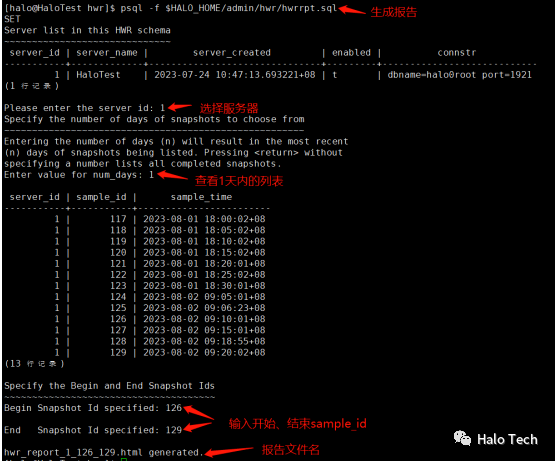
1. Using built-in script:
psql -f $HALO_HOME/admin/hwr/hwrrpt.sql2. Directly calling function to generate HTML file:
# By sample ID
psql -Aqtc "SELECT hwr.get_report(126,129)" -o report_126_129.html

# By time range
psql -Aqtc "SELECT hwr.get_report(tstzrange('2023-08-01 18:00:02+08','2023-08-02 09:20:02+08'))" -o report_range.html

# Last 24 hours
psql -Aqtc "SELECT hwr.get_report(tstzrange(now() - interval '1 day', now()))" -o last24h_report.html
The generated HTML report can be viewed with any web browser.