What is JDBC?
There was a previous introduction to HaloJDBC. That article focused more on the usage of HaloJDBC. This article will introduce JDBC from the perspective of underlying principles and architecture.
If Java wants to call a database, it must do so through the Java Database Connectivity,简称 JDBC. It is an Application Programming Interface (API) in the Java language that standardizes how client programs access databases. Through the JDBC API, the vast majority of data sources can be accessed. However, to access the data of a specific database system, a driver based on JDBC technology is required for adaptation. The Halo database has completed this adaptation work. The driver may be written purely in the Java programming language, or it may be a hybrid implementation of Java and Java Native Interface (JNI) native methods. The JDBC driver for the Halo database is written purely in Java.
JDBC Architecture
The JDBC API supports two-tier and three-tier processing models for database access, but the general JDBC architecture consists of two layers:
• JDBC API: Provides application management connections to JDBC.
• JDBC Driver API: Supports JDBC management connections to drivers.
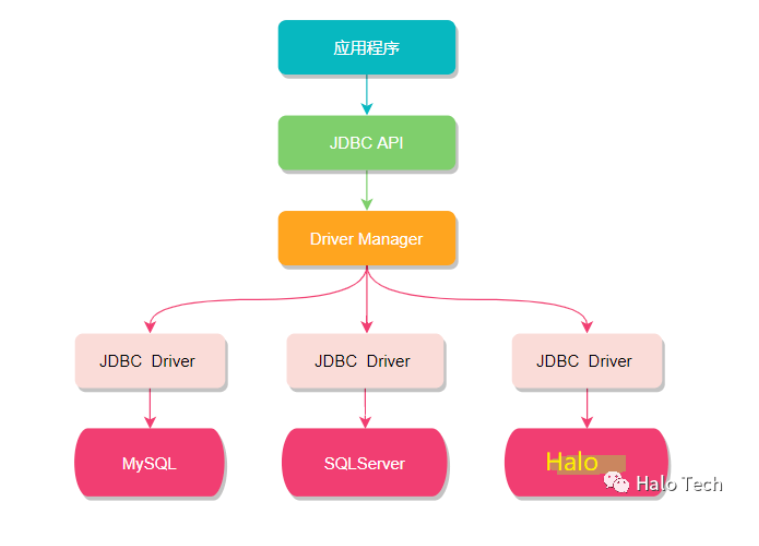
The JDBC API provides transparent connections to heterogeneous databases through the driver manager (DriverManager) and database-specific drivers.
The JDBC driver manager ensures that the correct driver is selected for each data source and supports multiple concurrent drivers connecting to multiple heterogeneous databases.
The following is the JDBC structure diagram, which shows the positional relationships between the driver manager, JDBC drivers, and Java applications:
Common JDBC Components
The JDBC API provides the following core interfaces and classes:
• DriverManager: Manages the list of database drivers, matches and loads the correct driver based on the communication sub-protocol to establish a database connection.
• Driver: Handles the underlying communication with the database server. It is usually not used directly, but is called internally by the DriverManager.
• Connection: Represents the connection context to the database; all database communication is conducted through this object.
• Statement: An object used to create and execute SQL statements. Its sub-interfaces (such as PreparedStatement, CallableStatement) support parameterized queries and stored procedure calls.
• ResultSet: Holds the data returned from the database after executing a SELECT statement, supporting row-by-row reading of results through iteration.
• SQLException: Used to capture and handle exceptions that occur during database operations.
JDBC Execution Flow
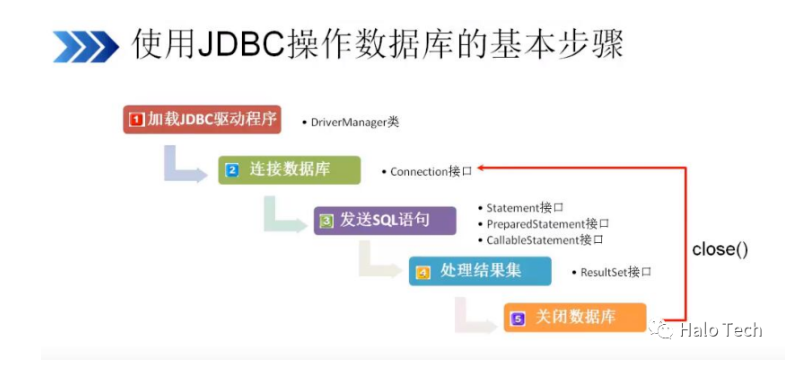
Step 1: Register the driver (tell the Java program which database it is about to connect to)
Step 2: Obtain a connection (establish a communication channel between the JVM process and the database process; this is a heavyweight operation and must be closed after use)
Step 3: Obtain a database operation object (i.e., Statement or its subclass, used to execute SQL statements)
Step 4: Execute the SQL statement (DQL, DML, etc.) and return a result set (if applicable)
Step 5: Process the query result set (only required if Step 4 executes a SELECT statement)
Step 6: Release resources and close the connection (resources must be explicitly closed after use to avoid connection leaks; this is inter-process communication between Java and the database, and the channel must be closed after opening)
Any errors occurring during the above process are handled by SQLException.
The flowchart is as follows:
Summary
The above provides a detailed explanation of the architectural design of JDBC and the invocation flow between various components. Subsequently, I will provide a detailed introduction to each interface. Stay tuned.