Before introducing the database read-write splitting cluster software, let's briefly review database installation and important parameter configuration, etc.
1. Installation of Halo Database
1. Install dependent software packages.
2. Create users and groups.
3. Create installation directories.
4. Extract the software package to the installation directory as the halo user.
5. Copy the license file to the installation directory.
6. Configure environment variables as the halo user.
7. Create the database process directory as the root user.
8. Adjust memory and semaphore parameters as the root user.
9. Adjust resource limit parameters.
10. Create and initialize the database.
11. Modify Halo parameters.
2. Directory Structure of Halo Database
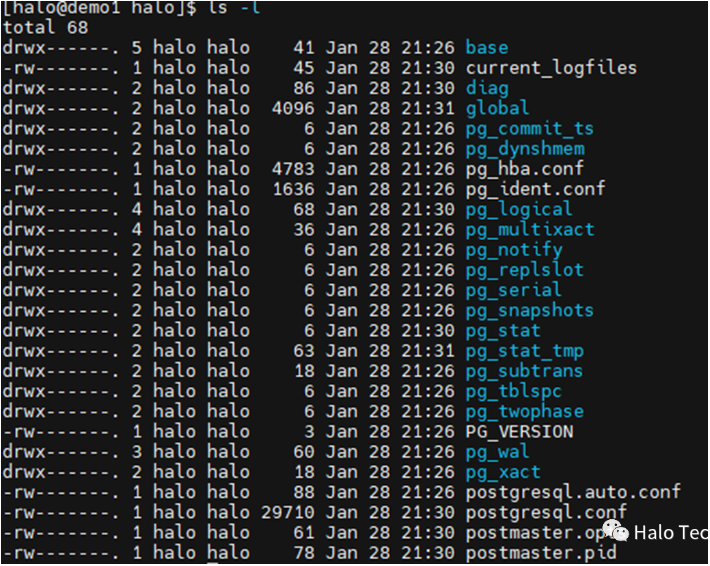
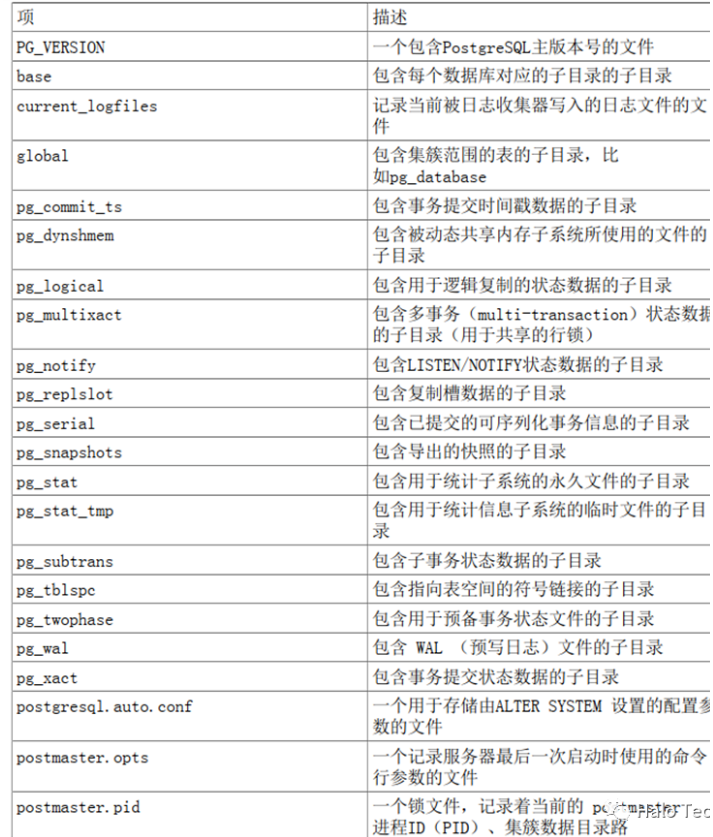
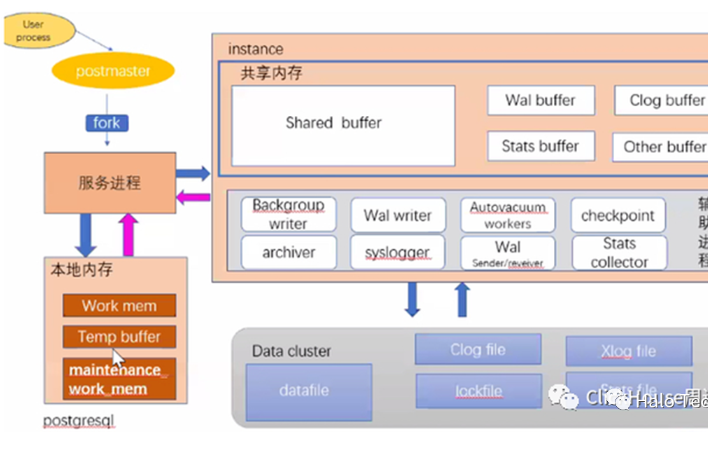
3. Architecture of Halo Database
postmaster: The main process of all database processes (responsible for monitoring and forking sub-processes).
syslogger: Records system logs.
pgstat: Collects statistical information.
pgarch: If archiving is enabled, postmaster forks an archiving process.
checkpointer: Responsible for the checkpoint process.
bgwriter: The process responsible for writing dirty data in shared buffer to disk.
autovacuum launcher: The process responsible for recycling garbage data. If autovacuum is enabled, postmaster forks this process.
autovacuum worker: The worker process responsible for recycling garbage data, forked by the launcher process.
4. Parameter Configuration of Halo Database
1. internal: Read-only parameter, cannot be modified after database creation.
2. postmaster: Requires Halo restart to take effect.
3. sighup: Can be modified in postgresql.conf, does not require restart, but requires sending a SIGHUP signal to the postmaster process, which then broadcasts to sub-processes. All sub-processes will take effect. Can be triggered via pg_ctl reload or select pg_reload_conf().
4. backend: Can be modified in postgresql.conf, no restart required, but only affects new connections; existing connections are unaffected.
5. superuser: Superusers can dynamically modify current session parameters via the SET command; SIGHUP only affects new connections.
6. user: Ordinary users can modify parameters for their own connection via SET.
5. Important Management Commands for Halo Database
Database start/stop: pg_ctl start/stop/restart/reload.
Database initialization: pg_ctl init.
psql parameters: -d database name; -U username; -h hostname; -p port number; for example psql -d lis -U db2inst1.
psql view database objects:
• \? help • \dt view tables • \d[S+] table_name view specific table information • \db view tablespaces • \dn view schema • \dv view views • \du view users • \dg view roles • \di view indexes • \dc view conversions • \dE view external tables • \des view external servers • \deu view user mappings • \df view functions • \sf function_name view function content • \l[+] view databases • \do view operators • \ds view sequences • \dx view extensions • \sv view_name view view content
Use psql to execute SQL files:
• Enter psql interactive mode, \i input.sql • psql -d lis -U db2inst1 -f input.sql >output.txt 2>&1
6. Commonly Used Management Functions for Databases
-- 1. Reload configuration file (equivalent to pg_ctl reload)
SELECT pg_reload_conf();

-- 2. Rotate log file (important)
SELECT pg_rotate_logfile();

-- 3. Terminate specified backend process
SELECT pg_terminate_backend(pid);

-- 4. Switch WAL log
SELECT pg_switch_wal();

-- 5. Get storage size of any value
SELECT pg_column_size(any);

-- 6. Get database size
SELECT pg_database_size('name');

-- 7. Get index size
SELECT pg_indexes_size('table_name');

-- 8. Get table size (excluding indexes, including TOAST, VM, FSM)
SELECT pg_table_size('table_name');

-- 9. Get database startup time
SELECT pg_postmaster_start_time();
The above is a brief review; let's now move on to the main topic!
7. Introduction to Read-Write Splitting DLB Instance
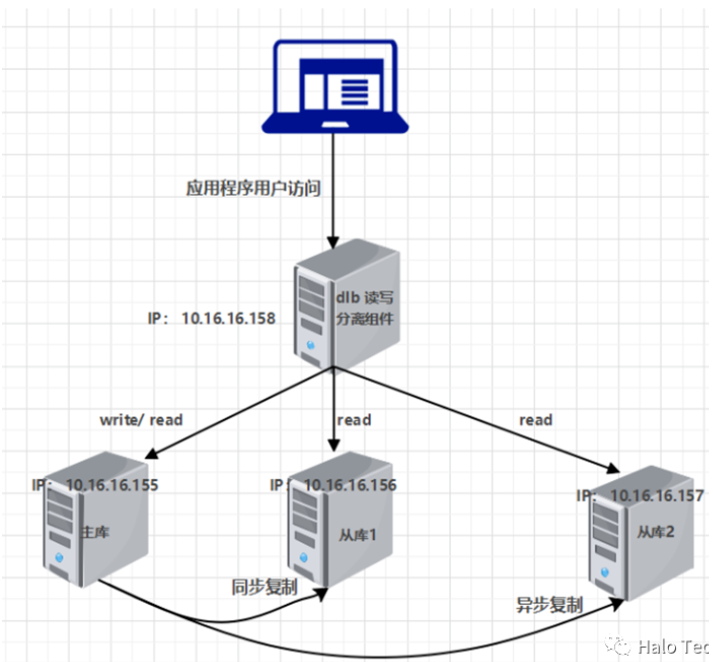
Principle of Read-Write Splitting: The Halo read-write splitting principle involves writing on the primary server and reading on the standby server. The primary server handles all write operation loads, while read operations are distributed across all primary and standby servers, thereby improving database concurrency and load capacity through read-write splitting. Generally, one database server is set as the primary server, responsible for data insertion, deletion, and modification tasks, with N database servers configured as standby servers, mainly responsible for data query tasks. Standby servers replicate data in real-time from the primary server to achieve data consistency.
Implementation of Read-Write Splitting: Applications configure primary and standby library addresses in the Halo application. DLB automatically sends read requests to standby libraries and write requests to the primary library. Additionally, Halo's DLB driver can achieve load balancing across multiple standby libraries.
Environment Preparation and Installation:
1. Network Planning
Primary: 192.168.137.31 Standby: 192.168.137.32 Standby: 192.168.137.33 DLB Host: 192.168.137.34
2. Configuration/Installation of DLB
1) Modify password authentication method in postgresql.conf on primary and standby machines
vi $PGDATA/postgresql.base.conf
password_encryption = md5# Load parameters
pg_ctl reload2) Create user halo_dlb on primary database halo131
CREATE ROLE halo_dlb SUPERUSER LOGIN PASSWORD 'halo_dlb';3) Modify configuration file pg_hba.conf on database cluster machines
vi $PGDATA/pg_hba.conf
# Add
host   all         all         0.0.0.0/0             md5
4) Configure pgpool.conf
cp pgpool.conf.sample pgpool.conf

listen_addresses = '*'
port = 1922

backend_hostname0 = 'halo131'
backend_port0 = 1921
backend_weight0 = 1
backend_data_directory0 = '/data'
backend_flag0 = 'DISALLOW_TO_FAILOVER'
backend_application_name0 = 'server0'

backend_hostname1 = 'halo132'
backend_port1 = 1921
backend_weight1 = 1
backend_data_directory1 = '/data'
backend_flag1 = 'DISALLOW_TO_FAILOVER'
backend_application_name1 = 'server1'

backend_hostname2 = 'halo133'
backend_port2 = 1921
backend_weight2 = 1
backend_data_directory2 = '/data'
backend_flag2 = 'DISALLOW_TO_FAILOVER'
backend_application_name2 = 'server2'

pid_file_name = '/var/run/halo/halo.pid'
sr_check_user = 'halo_dlb'
sr_check_password = 'halo_dlb'
sr_check_database = 'haloroot'
5) Add user environment /home/halo/.bash_profile
echo 'export PATH=/u01/app/halo/product/dlb/4.3/bin:$PATH' >> /home/halo/.bash_profile
source /home/halo/.bash_profile
6) Generate key pass
/u01/app/halo/product/dlb/4.3/bin/pg_md5 -m -u halo_dlb halo_dlb
cat /u01/app/halo/product/dlb/4.3/etc/pool_passwd
7) Add generated key to pcp.conf
cp pcp.conf.sample pcp.conf
vi pcp.conf
# USERID:MD5PASSWD
halo_dlb:md546172933bfb1d5d2207389730f8d5ec0
8) Configure DLB access address
cp pool_hba.conf.sample pool_hba.conf
vi pool_hba.conf
# Add
host    all        all         0.0.0.0/0             md5
9) Start DLB
# Create soft link
ln -s pgpool dlb

# Start in background
nohup dlb -n -d > /u01/app/halo/product/dlb/4.3/logs/dlb.log 2>&1 &

# Suggestion: Create a startup script
10) Verify Read-Write Splitting
psql -h 192.168.137.34 -p 1922 -U halo_dlb
# After entering password, execute
SHOW pool_nodes;
After successful verification, you can use the read-write splitting function!