Get started quickly with Halo Database Group Replication
1. Description
This feature enables group replication within the same cluster, where each group can contain multiple nodes and set different synchronization levels.
To enable group replication, you must first configure the synchronous replication parameters synchronous_standby_names and synchronous_commit, then configure synchronous_standby_namesX and synchronous_commitX (X is 1-4) according to your needs. The synchronization level set by synchronous_commitX must be lower than or equal to the synchronization level set by synchronous_commit.
2. Background
In a typical Same-city Disaster Recovery cluster, you can set the synchronization level of standby nodes in the same center to remote_apply, and the synchronization level of standby nodes in the Same-city Disaster Recovery center to on. This achieves Same-city RPO=0 (i.e., no data loss after fault recovery, consistent with the data state before the fault) while maximizing the performance of the primary database.
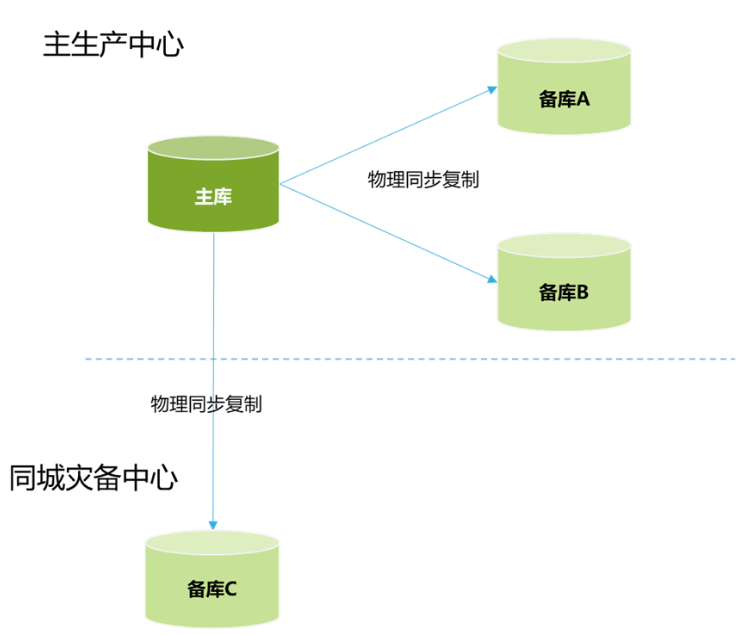
3. Configuration
Prepare four servers
Primary Database
node1: 10.16.16.155
Standby Database
node2: 10.16.16.156
node3: 10.16.16.157
node4: 10.16.16.162
1. Create a streaming replication user
CREATE USER replica PASSWORD '123456' REPLICATION;2. Modify postgresql.conf
vi /data/halo/postgresql.conf
listen_addresses = 'localhost'   Change to listen_addresses = '*'
----Group replication configuration:
synchronous_standby_names='1(node2,node4)'
synchronous_standby_names1='1(node3)'
synchronous_commit=remote_apply
synchronous_commit1=on
3. Configure pg_hba.conf
vi /data/halo/pg_hba.conf
host    replication     replica         10.16.16.0/24      md5
----After completing steps 1, 2, and 3, restart the database
pg_ctl restart4. Primary and Standby Database Configuration
vi /etc/hosts
10.16.16.155 node1 (Primary DB IP)
10.16.16.156 node2  Standby DB IP
10.16.16.157 node3  Standby DB IP -- Same-city Disaster Recovery
10.16.16.162 node4  Standby DB IP
1. Execute on Standby Database:
10.16.16.156:
pg_basebackup -F p -X stream -v -P -h 10.16.16.155 -U replica -D $PGDATA -R -C --slot node210.16.16.157:
pg_basebackup -F p -X stream -v -P -h 10.16.16.155 -U replica -D $PGDATA -R -C --slot node310.16.16.162:
pg_basebackup -F p -X stream -v -P -h 10.16.16.155 -U replica -D $PGDATA -R -C --slot node4Notes:
Comment out the content of the postgresql.auto.conf file on all standby databases, as the priority of the postgresql.auto.conf file is higher than postgresql.conf

2. Modify the /data/halo/postgresql.conf file on the standby database
vi /data/halo/postgresql.conf
10.16.16.156:
primary_conninfo = 'user=replica password=123456 channel_binding=prefer host=10.16.16.155 port=1921 sslmode=prefer sslcompression=0 sslsni=1 ssl_min_protocol_version=TLSv1.2 gssencmode=disable krbsrvname=halo target_session_attrs=any application_name=node2'--Start
pg_ctl startQuery:
show primary_conninfo;10.16.16.157:
primary_conninfo = 'user=replica password=123456 channel_binding=prefer host=10.16.16.155 port=1921 sslmode=prefer sslcompression=0 sslsni=1 ssl_min_protocol_version=TLSv1.2 gssencmode=disable krbsrvname=halo target_session_attrs=any application_name=node3'--Start
pg_ctl startQuery:
show primary_conninfo;10.16.16.162:
primary_conninfo = 'user=replica password=123456 channel_binding=prefer host=10.16.16.155 port=1921 sslmode=prefer sslcompression=0 sslsni=1 ssl_min_protocol_version=TLSv1.2 gssencmode=disable krbsrvname=halo target_session_attrs=any application_name=node4'--Start
pg_ctl startQuery:
show primary_conninfo;
Query Streaming Replication on the Primary Database
select * from pg_stat_replication;
show synchronous_standby_names;
show synchronous_standby_names1;
show synchronous_commit;
show synchronous_commit1;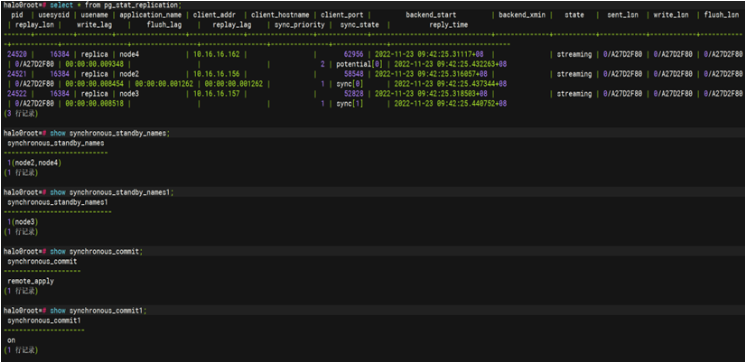
A complete group replication setup is now configured!